
Restyling a website without losing a word
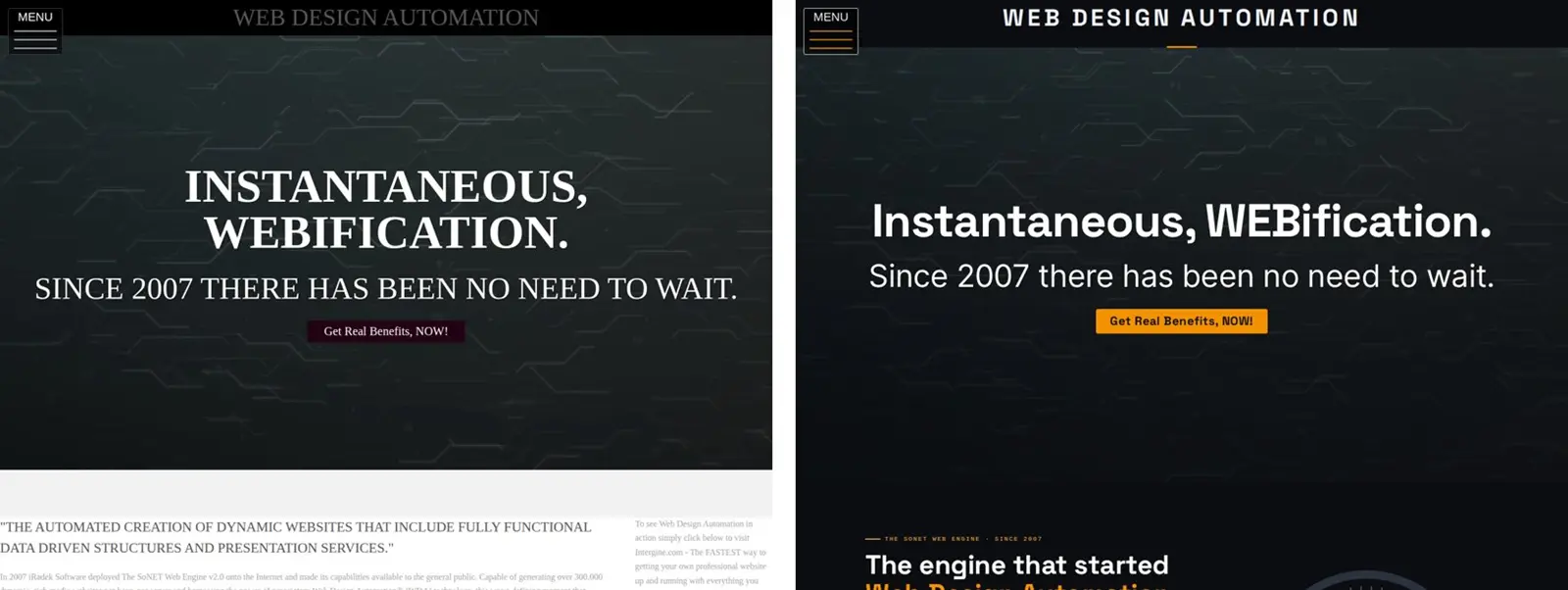
Much of this website still described the engine as it was in 2007 and 2020. In October 2026 it got a new look and new pages. This is how we did it without losing a word, a link or a customer's quote along the way.
Start with a copy of everything
Before changing anything, we saved every public page as visitors see it: 19 pages, from the home page to each picture in the case study gallery. We also saved the Template Kit's settings, so the old look could come back with one command. A redesign you cannot undo is a gamble, and this one did not need to be.
Change the look in one place
The new look, iRadek's black and gauge orange with the Space Grotesk and Inter typefaces, lives in the Template Kit: its colors, its fonts, and one block of custom CSS. Because the whole site reads from there, every page changed at once, including pages we did not rewrite, such as Consumer Reviews and Support. Nothing had to be copied into each page.
One snag: this template has no setting for a separate heading font. The font files are on the server anyway, so the CSS declares them and uses them. That is the kind of thing the Template Kit's custom CSS box is for.
Rewrite only what was out of date
Four pages were rewritten: the home page, Speed, Functionality and Security. The rest kept their words. Some of the old content had aged: a 2020 price table compared against competitors' prices that have changed since, and some measurements were six years old. We kept the 2020 measurements, labelled with their dates, as the historical record, and added new ones taken on the day.
Customers' reviews were left exactly as they wrote them, typing slips included. A quote you tidy up is no longer their quote.
Check every page with the old copy
After saving, every page was compared word by word with the copy taken at the start. Only the four rewritten pages and a handful of deliberate typo fixes showed a difference. Nothing went missing by accident.
Read it the way visitors will
Then every page was checked as a visitor, on a computer and on a phone-sized screen:
- Contrast. An automatic check found the old template's pale grey text reading at about 2.3 to 1 against its background, well under the 4.5 to 1 that text needs. It was darkened everywhere.
- Phones. On a narrow screen the site title ran underneath the menu button, and the page bands stopped short of the screen edges. Both were fixed and checked again.
- Links and pictures. Every link was followed, and the pictures in our own content that had no description were given one that says what they show.
What we would tell anyone redesigning a site
- Copy everything first, and know how you would undo the change before you make it.
- Put the look in one place, not in every page.
- Rewrite what is wrong or out of date, date what is historical, and leave what is still true alone.
- Check by measuring, not by glancing: words against the old copy, contrast with a checker, the layout on a real phone.
The whole job was done through the SoNET Web Engine's own admin screens, the same ones every site owner has.