
How fast is fast? Timing a website from click to finished page
"Your website in seconds" is a claim every builder makes. Here is how fast the SoNET Web Engine really is, where the time goes, and how to check any of it yourself.
Two different clocks
When people talk about how fast a website is made, they usually mix up two clocks.
The first is the engine's own clock: how long it takes to create a complete website, with its pages, its data structures, its store, forms and app. Through the API, the SoNET Web Engine creates over 50 websites per second, and it does that on a 2007 Dell PowerEdge server with two Xeon processors and 8 GB of RAM. That is about two hundredths of a second for each site.
The second is the clock you see in your browser. It includes the engine's work, but also the trip from the hosting to your device, and the time your browser takes to download and draw the page. On the open Internet that second clock is always the longer one.
What we measured
On 28 October 2026 we pressed "Start my demo" on website-kiosk.com three times, in an ordinary browser, timing from the click:
- The server answered with the new website within 0.80, 0.81 and 0.86 seconds. That includes the round trip across the Internet.
- The finished site was fully loaded, with us signed in as its administrator, after 2.67, 2.71 and 2.83 seconds.
Every run produced a new site of its own, ready to edit. The other two seconds or so are not the engine at all: they are the network and the browser drawing a full page with its pictures and fonts.
Fast to build is not the same as fast to visit
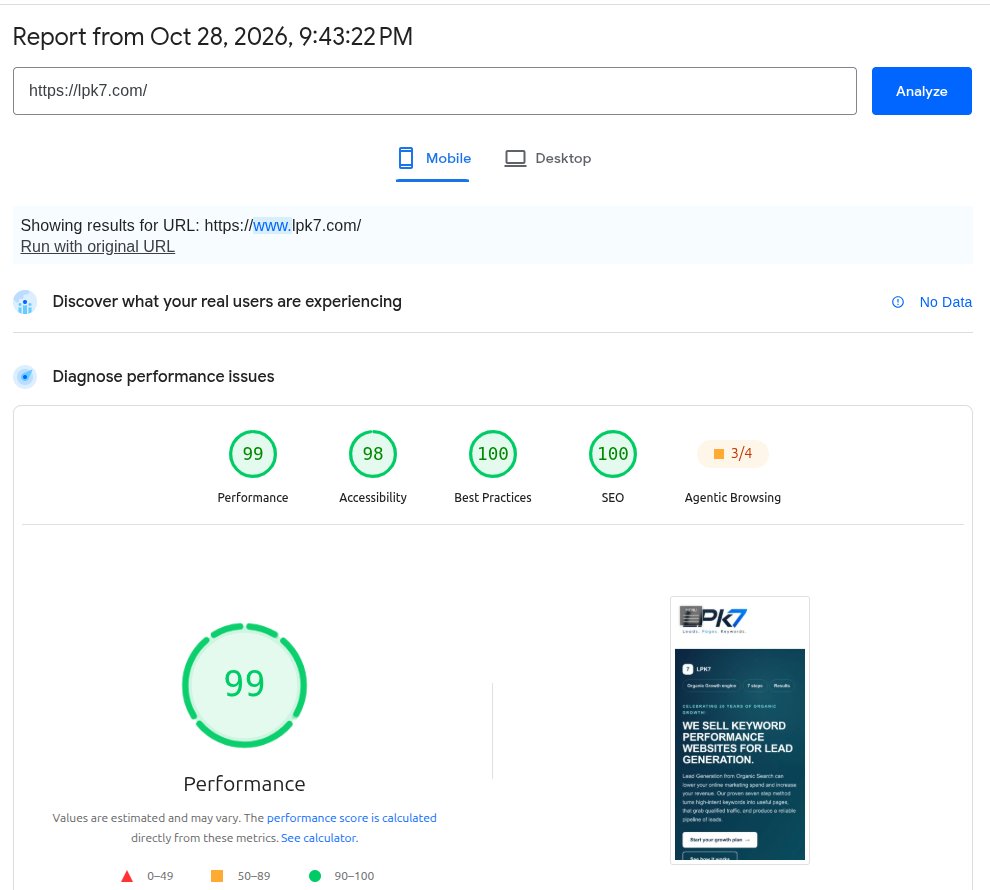
Visitors never see how long your site took to make. They see how long each page takes to appear on their phone, and so does Google. On the same day we tested two SoNET sites with Google PageSpeed Insights:
- lpk7.com: performance 99 on mobile and 100 on desktop
- acommerceshop.com, a working online store: 96 on mobile and 100 on desktop
Both had a Total Blocking Time of 0 ms, which means nothing on the page held up the visitor's browser while it loaded.
Check it yourself in five minutes
- Open pagespeed.web.dev and paste in your own site's address.
- Look at the Mobile tab first. Most visitors are on phones, and the mobile test is the hard one: it imitates a mid-range phone on a slow connection.
- Read three numbers. Largest Contentful Paint is when the main content appears; under 2.5 seconds is good. Total Blocking Time is how long scripts freeze the page; lower is better. Cumulative Layout Shift is how much the page jumps around while it loads; close to 0 is good.
- Run it twice. Scores move a few points from run to run, so compare the same kind of test on the same day.
- Then test your competitors' sites and your provider's own site. If a provider's own website scores badly, ask why.
The full comparison of the five most-used website platforms is in the Instant Website Maker Speed Report, and the history of our measurements is on the Speed page.